The tutorials all show you one VPC. One tidy box, a couple of subnets, a gateway to the internet, done. Then you get a real job and discover that nobody has one VPC. You have one per environment, sometimes one per account, plus a few for things that had to be isolated, plus a data center or two that never went away, plus partners who need to reach exactly one service and nothing else.
The real networking work in the cloud is almost never inside a VPC. It is between them.
That is the part the tutorials skip, and it is the part that pages you.
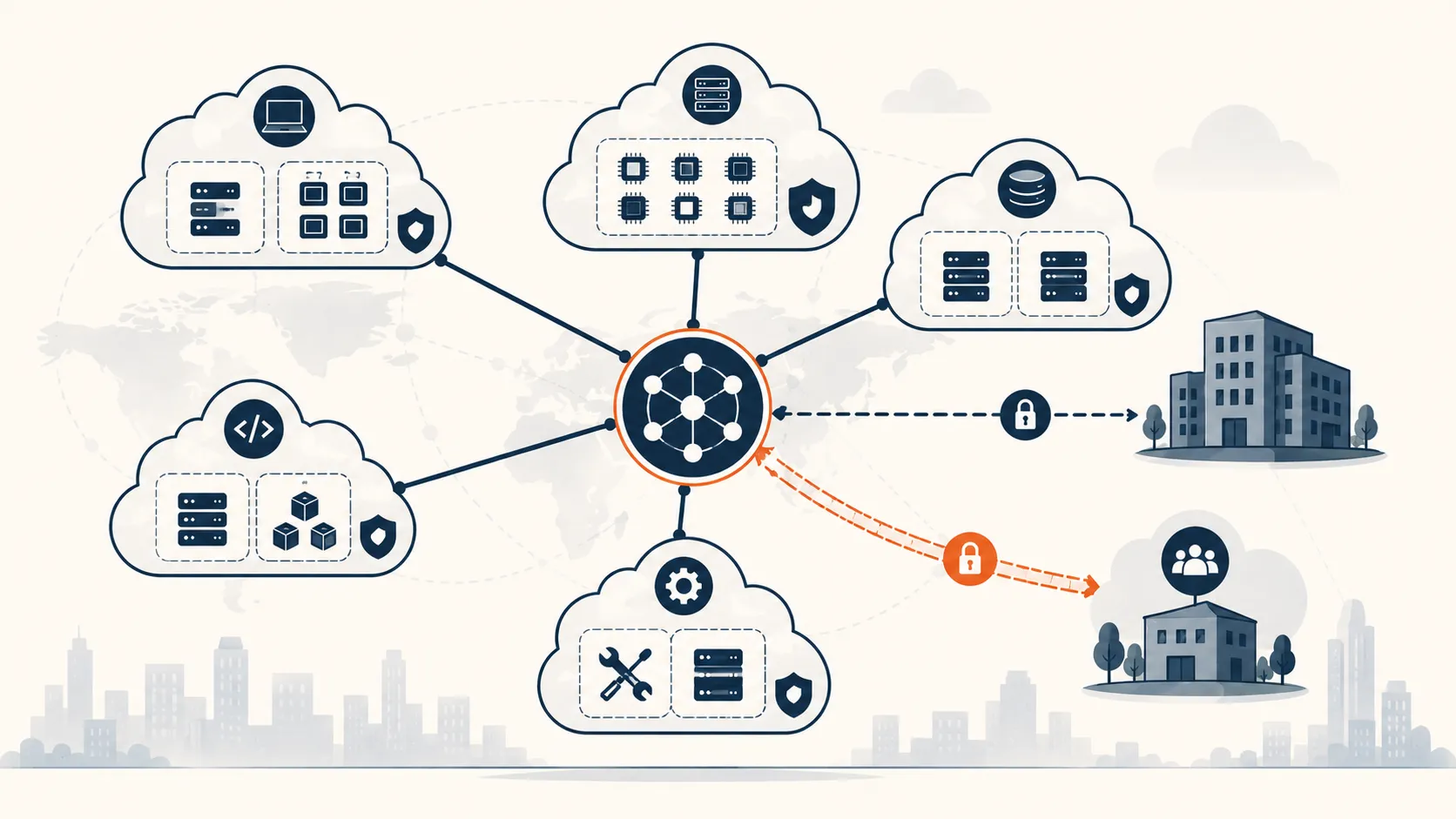
Table of contents
Open Table of contents
- The short version
- The problem: many islands, and traffic that needs to cross
- Tool one: VPC peering, the straight wire
- Tool two: the transit gateway, the hub you graduate to
- Tool three: site-to-site VPN, reaching off the island
- The decision that quietly governs all of it: CIDR planning
- A pattern worth stealing: one isolated module per connection
- Final takeaway
The short version
- You will end up with many VPCs, across many accounts, plus on-premise networks and partners. Joining them is the cloud version of the wide-area network.
- There are three main tools: VPC peering for simple one-to-one links, a transit gateway for a hub that many networks attach to, and site-to-site VPN for reaching things outside the cloud.
- Peering is cheap and simple but does not scale, because it is one-to-one and non-transitive. A transit gateway is the hub you graduate to.
- Site-to-site VPN gives you two tunnels for redundancy, and you route over it with either static routes or BGP, depending on what the other side can speak.
- None of it works if your address spaces overlap. CIDR planning is not paperwork. It is the load-bearing decision, and it has to happen before you connect anything.
The problem: many islands, and traffic that needs to cross
Every VPC is an island on purpose. Isolation is the point. But isolation you cannot selectively break is just a wall, and real systems need traffic to cross: a service in the dev account pulling from a shared tooling VPC, a workload reaching a database that lives on-premise, a partner sending events to one endpoint you exposed for them.
So the question that defines cloud networking at any real scale is not “how do I build a VPC.” It is “how do I join two networks that were deliberately separate, and let across only the traffic that should cross.” Same question I used to answer with leased lines and firewall rules between sites. The tools have new names. The judgment is identical.
Tool one: VPC peering, the straight wire
Peering is the simplest thing that can possibly work. You draw a direct link between two VPCs, add routes on both sides, and now they can talk. No extra appliance, no hourly charge for a hub, and traffic stays on the provider’s backbone.
The catch is two words: non-transitive. If A peers with B, and A peers with C, that does not let B talk to C. Every pair that needs to communicate needs its own peering link. With three VPCs that is fine. With ten it is forty-five links and a diagram nobody can read. Peering is the right answer for a couple of VPCs that need a direct, private path and nothing more. The moment you feel yourself drawing the fourth or fifth link, you have outgrown it.
Tool two: the transit gateway, the hub you graduate to
A transit gateway flips the model from a mesh to a hub and spoke. Every network attaches to the hub once, and the hub decides who can reach whom. Ten VPCs become ten attachments, not forty-five links.
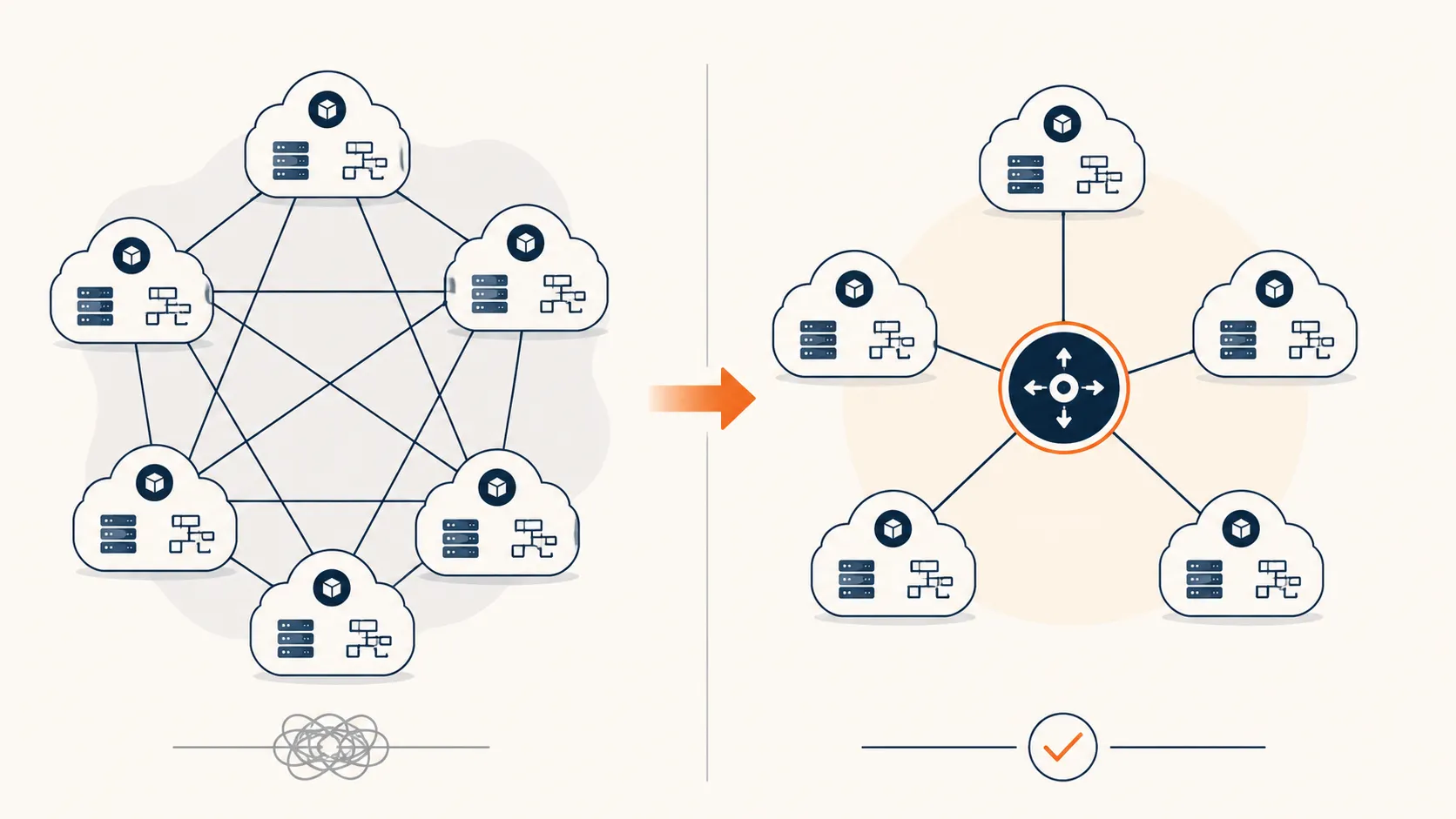
                     transit gateway (the hub)
                              |
        ┌──────────┬──────────┼──────────┬──────────┐
        │          │          │          │          │
     dev VPC   prod VPC   shared VPC   VPN to     VPN to
                                       on-prem    a partner
The important part is that the hub is not a dumb switch. It has its own route tables, and that is where the policy lives. An attachment can only reach another attachment if the hub’s routing says so. You can let dev and prod both reach shared tooling while keeping them completely blind to each other, just by how you write the hub routes. It also crosses account boundaries cleanly, which matters the day your VPCs live in separate accounts for isolation and billing.
This is the part worth saying plainly, because it is easy to miss: the hub gives you central connectivity, but the route tables are what keep that connectivity from collapsing into one big flat network. Attach everything to a hub with a single permissive route table and you have rebuilt the flat network you were trying to escape, just with an appliance in the middle. The segmentation does not come from the hub existing. It comes from how you write its routes.
The trade-off is cost and a bit of ceremony. A transit gateway charges per attachment and per gigabyte, and it bills per availability zone, so spreading an attachment across four zones costs more than across two. That is a real number worth looking at. On one setup I trimmed attachment zones down to what we actually needed and the bill noticed. The hub is worth it well before you are forced into it, but it is not free, so attach deliberately.
Tool three: site-to-site VPN, reaching off the island
Peering and transit gateways join things inside the cloud. To reach a data center or a partner, you need an encrypted tunnel across the public internet, and that is site-to-site VPN.
Two details matter more than the rest. First, a VPN connection gives you two tunnels, to two different endpoints, precisely so a single failure does not drop the link. Use both. Second, you route over it in one of two ways:
- BGP, where the two sides exchange routes automatically and failover between tunnels just happens. Use this whenever the other end can speak it.
- Static routing, where you type the remote prefixes in by hand. Less elegant, less automatic, and more dependent on how the other side handles failover between the two tunnels. It is what you fall back to when the far side is an appliance that does not speak BGP, which happens more than you would like.
The clean pattern is to terminate the VPN on the transit gateway rather than on a single VPC. Then every spoke behind the hub can reach the remote network through one tunnel, governed by the same hub route tables, instead of each VPC needing its own connection.
# in a spoke VPC's route table, the partner's network points at the hub
10.0.0.0/16       local        # stay inside this VPC
203.0.113.0/24    tgw-xxxx     # partner network, reached via the transit gateway
That one route is what lets a workload deep inside a private subnet reach a partner across a VPN, without a public IP and without touching the internet.
The decision that quietly governs all of it: CIDR planning
Address space feels theoretical until two networks need to talk. Then it becomes the most concrete thing in the room. Every technique above assumes the two networks you are joining do not use overlapping address ranges. If your VPC is 10.0.0.0/16 and the partner is also 10.0.0.0/16, they can never route to each other, and there is no setting that fixes it. One side has to renumber, and renumbering a live network is a project, not a change.
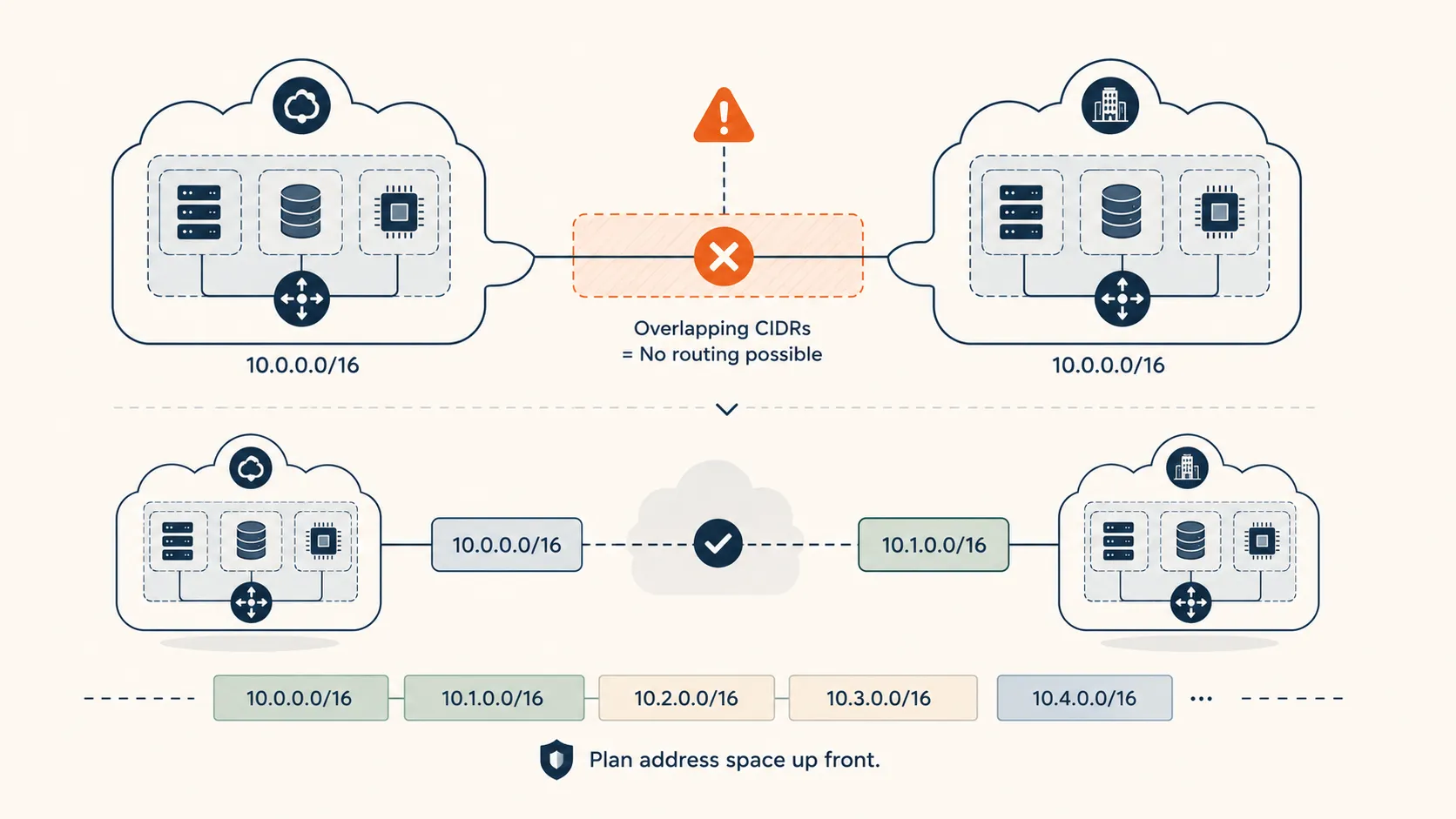
So the ranking of the tools is almost a footnote compared to this: plan your address space before you connect anything. Hand out non-overlapping CIDRs to every VPC, every account, every partner you might one day integrate, even the ones you have no plans to connect yet. The cost of reserving clean ranges up front is a spreadsheet. The cost of discovering an overlap after both sides are in production is a migration with downtime. I have never once regretted allocating address space too carefully.
A pattern worth stealing: one isolated module per connection
When you connect outside parties, resist the urge to pile them into one shared configuration. The pattern that has served me is one self-contained module per partner: its own VPN connection, its own security group, its own monitoring, its own routes.
| Model | Where the other end lives | How it connects |
|---|---|---|
| Fully in-cloud | Another VPC, maybe another account | Peering or transit gateway |
| Partner with an appliance | Their network, behind an IPsec device | Site-to-site VPN onto the hub |
| Small partner, no VPN | Their network, no appliance at all | Outbound through a stable, allowlistable egress identity |
The payoff is blast radius. Adding a partner is a deploy that cannot touch the others. Removing one is a clean teardown. When something breaks, its logs and its routes are its own, not tangled into a shared block you are afraid to edit. It costs a little more structure up front and it saves you every single time a connection misbehaves, which they do.
Final takeaway
The cloud did not invent the wide-area network, it just renamed the parts. Peering is a cross-connect. A transit gateway is the core router your whole topology hangs off of. A VPN is the same encrypted tunnel to the other site you have always built. And a route table is still the place where you decide, one line at a time, who is allowed to reach whom.
If you take one thing from this, make it the CIDR discipline, because it is the only decision here that you genuinely cannot undo cheaply. Everything else is an attachment you can add or remove on a quiet afternoon. Overlapping address space is the one mistake that waits months and then hands you a migration. Plan the addresses first. Wire the rest as you go.