Kubernetes can scale pods. That does not mean your architecture is scalable.
That sounds obvious until you are staring at a system where CPU is fine, memory is fine, pods are healthy, the load balancer is passing traffic, and the application still behaves like it is haunted.
The problem was not Kubernetes. It was that the network model, the protocol behavior and the application state were all making assumptions that stopped being true the moment the system became distributed. Cloud made the diagram prettier. TCP did not care.
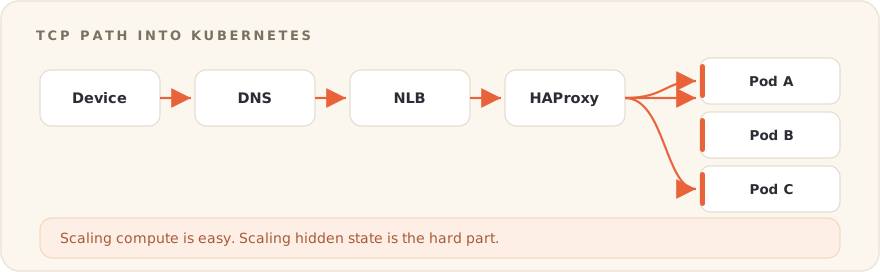
Table of contents
Open Table of contents
The short version
- Kubernetes scaled the pods fine.
- The NLB and HAProxy were healthy.
- CPU and memory were never the problem.
- The real issue was hidden session ownership.
- Long-lived TCP connections need explicit, shared state.
The architecture looked clean
On paper it was reasonable. Remote devices connected to a public endpoint, DNS pointed to a Network Load Balancer, the NLB forwarded TCP into Kubernetes, and HAProxy handed each connection to one of many connector pods. Each pod consumed messages, handled the device session and talked to queues.
Something like this:
Remote device
  -> DNS
  -> Network Load Balancer
  -> Kubernetes
  -> HAProxy
  -> Connector pod
  -> Queue
Nothing exotic, nothing clever. The kind of architecture that looks perfectly fine in a meeting. And most of the time, it worked. That is what made the problem interesting.
The problem was not capacity
The first instinct in Kubernetes is to blame capacity. The usual suspects all checked out:
- CPU? Fine.
- Pods restarting? No.
- Memory pressure? No.
- NLB healthy? Yes.
- HAProxy overloaded? No.
Replicas were there, nodes were there, the load balancer was accepting connections, and the logs were not screaming with obvious errors.
But some devices behaved inconsistently after network changes, reconnects or failover. A device could connect through one path, lose connectivity, fail over to another path and reconnect. From the infrastructure side that looked normal. From the application side it was not.
The system had a hidden assumption: one active connection meant one active owner. That assumption got fragile the moment reconnections, long-lived TCP sessions and multiple pods entered the picture.
More replicas help only when the workload can be safely distributed. If the workload has hidden state, adding replicas just makes the failure mode harder to understand.
Long-lived TCP changes the game
HTTP is easy to reason about. A request comes in, a pod handles it, the response goes out. If the next request lands on another pod, fine, as long as the app is stateless or stores its state somewhere shared.
Long-lived TCP is different. A connection is not a request, it is a relationship. The pod holding it keeps in-memory state about the client: the last packet received, the session status, the queue being consumed, the protocol phase, the device identity. None of that is visible to another pod.
So when a device reconnects and lands somewhere else, you get several versions of reality at once:
- one pod still believes it owns the session
- another pod just received the new connection
- the device believes it is connected
- the old TCP session is not fully dead yet
Everybody is technically correct, which is the worst kind of correct.
Why Kubernetes did exactly what it should
It is tempting to blame Kubernetes, the NLB or HAProxy here. But every layer was doing its job:
- the NLB accepted TCP connections
- HAProxy distributed traffic
- Kubernetes kept pods running
- the scheduler placed workloads
From an infrastructure perspective, the system was available. The missing piece was not availability. It was ownership.
Who owns the device session right now? That needs a real answer, not an assumption. Not “probably the pod that got the last packet”. Not “the old connection should disappear soon”.
The hidden state problem
The architecture had state, but the state was not explicit enough. It was scattered:
- some lived in the connection
- some lived in pod memory
- some lived in the queue model
- some lived in how remote devices behaved during failover
That is manageable in a single process or a small static setup. It gets dangerous the moment the platform scales horizontally. The trap: the system looks distributed, but part of its brain is still local.
| Actor | What it believes |
|---|---|
| Pod A | I still own device 123 |
| Pod B | I just received device 123 |
| Device 123 | I reconnected successfully |
| The platform | All targets are healthy |
| On-call engineer | I should have opened a bakery |
At that point, more pods are not the fix. They are just more places for state to disagree.
Make ownership explicit
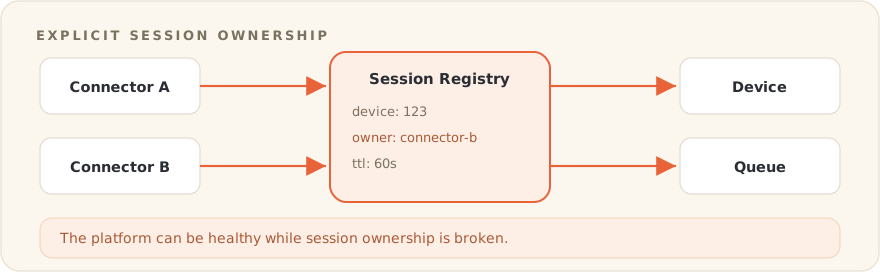
The pattern I reach for here is a session registry. Not because Redis is magic, it is not. The idea is to move ownership out of implicit local memory and into an explicit shared place every pod can check.
For example:
session_registry:
  key: "device:{device_id}"
  value:
    owner_pod: "connector-7f9c8d"
    source_ip: "10.20.30.40"
    connected_at: "2026-03-12T12:00:00Z"
    last_heartbeat_at: "2026-03-12T12:00:30Z"
  ttl_seconds: 60
Now a pod does not assume ownership when a device connects. It checks the registry first:
- no owner? claim it
- owner is me? continue
- owner is another pod? check if that owner is still alive
- old owner is stale? take over
- old owner is active? reject the duplicate
The details depend on the protocol, timeouts and business rules. The principle does not: make the current owner visible.
A safer connection flow
The flow starts to look intentional:
Remote device
  -> NLB
  -> HAProxy
  -> Connector pod
  -> Identify device
  -> Check session registry
  -> Claim, continue or reject
  -> Heartbeat ownership
This is not just a technical win, it is an operational one. During an incident you can finally answer:
- which pod owns this device?
- when did it last heartbeat?
- is there a duplicate connection?
- did ownership move after a failover?
- is the old session stale or active?
Those questions are gold when debugging production. Without them, you are reconstructing reality from the logs of many pods with grep, hope and caffeine. I like grep. I do not like it being the only source of truth.
Trade-offs
A session registry is not free. It adds a moving piece, and it needs TTLs, failure handling, careful split-brain decisions, observability, and clear behavior when the backend goes down.
So it is not “registry good, no registry bad”. It is a choice between failure modes:
| Option | Benefit | Risk |
|---|---|---|
| Keep ownership in local memory | Simple and fast | Hard to reason about during reconnects and horizontal scaling |
| Use sticky behavior | Can reduce movement | Does not solve failover or stale ownership by itself |
| Use an explicit session registry | Better visibility and control | Adds a dependency and implementation complexity |
| Move protocol handling outside Kubernetes | More control over networking | More infrastructure to operate |
There is no perfect option. There is only the one whose failure mode you understand best.
If a system needs state to behave correctly, make that state visible, observable and recoverable. Hidden state is where clean diagrams go to die.
What I would monitor
Pod CPU, memory and restarts are necessary here, but nowhere near enough. I would also track:
active_sessions_total
duplicate_session_attempts_total
session_ownership_changes_total
stale_sessions_total
session_registry_errors_total
device_reconnects_total
connection_duration_seconds
messages_consumed_per_session
And I would want logs that make session movement obvious:
{
  "event": "session_ownership_changed",
  "device_id": "device-123",
  "previous_owner": "connector-a",
  "new_owner": "connector-b",
  "reason": "previous_owner_stale",
  "ttl_seconds": 60
}
That is the kind of log that saves time. Not because it is fancy, but because it answers the question you will actually ask during an incident.
What I learned
The lesson was not “do not run TCP workloads on Kubernetes”. That is too simple, and not true. Kubernetes runs TCP fine, NLBs handle TCP, HAProxy can be a good fit, and horizontal scaling helps a lot.
But long-lived TCP sessions need a different level of design discipline. Before the incident, not during it, you want to know:
- where state lives
- who owns a session
- what happens when the client reconnects
- what happens when the old connection is not dead yet
Final takeaway
Kubernetes made it easy to scale the compute layer. It did not make the protocol stateless, the client predictable or the ownership model safe. That part was still our job.
Cloud abstractions are useful, but they do not remove fundamentals. TCP is still TCP. Linux still matters. Networking still matters. State still matters.
And when it breaks, the system does not care how nice the diagram looked in the architecture review. It only cares whether the design can survive reality.