The AWS bill was not the real problem.
The real problem was that production, staging, experiments, security logs and a few forgotten test resources were all living under the same roof. One account. One blast radius. One very optimistic idea of governance.
A single AWS account feels simple because the complexity is hidden. It only becomes visible when an incident, an audit, a broken deployment or the monthly bill forces everyone to look at the same mess.
This is why I like multi-account AWS structures. Not because they look nice in an architecture diagram, but because they create boundaries where boundaries actually matter.
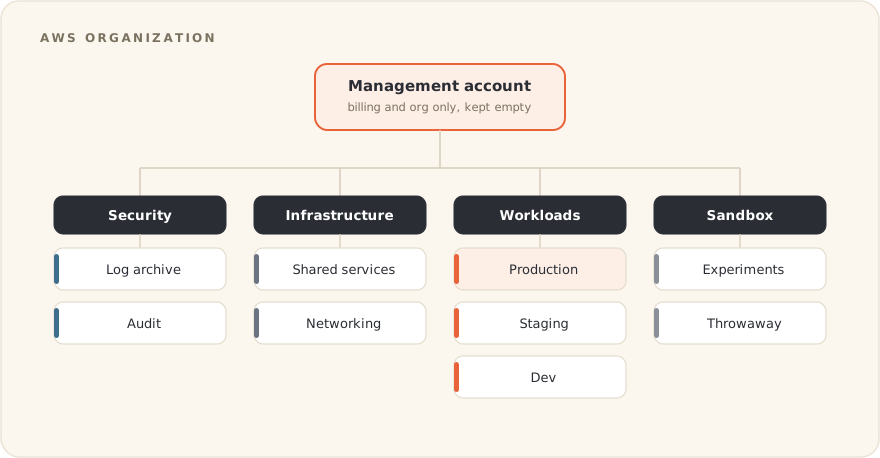
Table of contents
Open Table of contents
One account is fine, until it is not
One AWS account usually starts with good intentions.
A small environment. A few services. Maybe one production workload. Then staging appears. Then dev. Then some experiments. Then a temporary bucket that becomes permanent because, of course, temporary infrastructure has a strong survival instinct.
At some point, the account stops being an environment and becomes a shared basement.
Everything is there:
- production workloads
- staging workloads
- developer experiments
- old resources nobody wants to touch
- logs
- CI/CD roles
- admin users
- random security exceptions
- cost surprises
Technically, it still works. Operationally, it starts to smell funny.
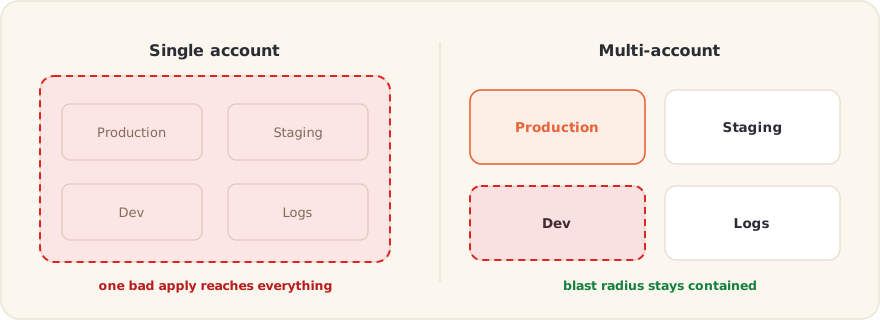
The problem is not that a single account cannot run workloads. It can. The problem is that it gives very different things the same boundary.
And in AWS, boundaries matter.
It is one of the strongest isolation boundaries you get. Treating it like a folder is how teams end up debugging governance with panic in their eyes.
The real reason to split accounts
Multi-account is not about making the organization chart look mature. It is about separating things that should fail, be billed, audited and protected independently.
That usually comes down to four practical reasons.
| Reason | Why it matters |
|---|---|
| Blast radius | A bad IAM policy, a wrong Terraform apply or a compromised credential should not have a clear path to everything. |
| Billing clarity | If dev, prod and experiments share the same account, cost allocation becomes detective work. |
| Security boundaries | Logs, audit tooling and production workloads should not live under the same trust model. |
| Quotas and limits | Many AWS limits are account scoped. Separate accounts give you more operational headroom. |
The account is the coarse boundary. Tags, IAM policies and naming conventions are finer controls. You want both, but they do not solve the same problem.
If your governance depends only on everyone remembering to tag resources correctly, you do not have governance. You have hope.
Hope is not a strategy. It is also a terrible cost allocation model.
The structure I usually reach for
I prefer organizing accounts by role, not by team.
Teams change. Reporting lines change. A squad that owns a service today may not own it next year. But production, security logs, networking and sandbox experiments still have different risk profiles.
A simple structure can look like this:
AWS Organization
├── Management Account
├── Security OU
│   ├── Log Archive Account
│   └── Audit Account
├── Infrastructure OU
│   ├── Shared Services Account
│   ├── Networking Account
│   └── DNS Account
├── Workloads OU
│   ├── App Prod Account
│   ├── App Staging Account
│   └── App Dev Account
└── Sandbox OU
    ├── Experiment Account
    └── Temporary Lab Account
This is not the only valid structure, but it has a few properties I like.
The management account stays almost empty. It handles billing and AWS Organizations. That is it. No workloads, no experiments, no random Lambda function someone forgot about.
The security accounts are protected harder than the others. Logs and audit trails need a different level of protection because they are useful exactly when something goes wrong.
The infrastructure accounts hold shared things like DNS, networking, shared CI/CD, transit gateways and other services multiple workloads depend on.
The workload accounts separate environments. Production gets its own account. Staging gets its own account. Development gets its own account.
Sandbox accounts are disposable by design. They exist so people can test things without turning production into a playground.
The rule of thumb
The rule I use is simple:
If two things should fail independently, be billed independently or be secured independently, they probably belong in separate accounts.
This rule prevents two common mistakes.
The first mistake is creating too few accounts and calling it simplicity.
The second mistake is creating too many accounts without a clear reason and calling it governance.
Both can hurt. The goal is not account sprawl. The goal is useful isolation.
Guardrails beat good intentions
Account structure gives you the map. Guardrails make sure people cannot drive off the cliff.
This is where Service Control Policies, or SCPs, become useful. SCPs define the maximum permissions available inside an account or OU. They do not grant access. They limit what can ever be allowed.
That distinction matters.
IAM says what someone can do inside the house. SCPs define what is illegal in the neighborhood.
A few guardrails usually earn their place early:
- deny leaving the AWS Organization
- deny disabling or deleting CloudTrail
- restrict unused or unsupported regions
- protect the management account from workload activity
- prevent public access changes in sensitive accounts
- block dangerous root user actions where possible
A simple example:
{
  "Version": "2012-10-17",
  "Statement": [
    {
      "Sid": "DenyLeavingOrganization",
      "Effect": "Deny",
      "Action": "organizations:LeaveOrganization",
      "Resource": "*"
    },
    {
      "Sid": "DenyDisablingCloudTrail",
      "Effect": "Deny",
      "Action": [
        "cloudtrail:StopLogging",
        "cloudtrail:DeleteTrail"
      ],
      "Resource": "*"
    }
  ]
}
This is not a complete security strategy. It is a starting point.
The idea is to block actions that should almost never happen in a healthy environment. If someone needs to stop CloudTrail during an incident, that is not a normal ticket. That is a conversation.
Where cost gets easier
Cost is where multi-account often pays for itself politically.
When everything lives in one account, the bill becomes a negotiation. Finance asks why the bill increased. Engineering opens Cost Explorer. Everyone hopes the tags are correct. Someone discovers that half the resources are tagged dev, Dev, development, test or not tagged at all.
Beautiful.
With separate accounts, the account becomes the first reliable cost dimension.
You still need tags for service, owner, project and application level details. But the linked account already tells you a lot:
- production cost
- staging cost
- development cost
- sandbox cost
- shared infrastructure cost
- security tooling cost
This makes conversations easier.
Instead of asking, “Why did AWS get expensive?”, you can ask, “Why is staging running at 62% of production cost?”
That is a much better question.
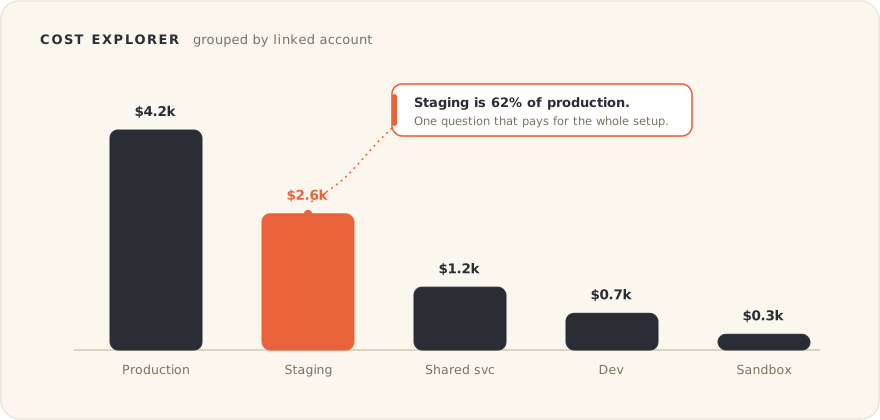
Before buying another cost platform, open Cost Explorer and group by linked account. A good account structure answers many cost questions for free.
What I would avoid
Multi-account helps, but it does not magically fix bad operations. You can still make a mess. You just get more accounts to make the mess in.
A few things I would avoid:
| Mistake | Why it hurts |
|---|---|
| Running workloads in the management account | It turns the most sensitive account into a busy account. That is a bad trade. |
| Mapping accounts only to teams | Teams change faster than architecture boundaries. |
| Relying only on tags for cost allocation | Tags are useful, but they depend on discipline. Account boundaries are harder to forget. |
| Creating sandbox accounts without budget limits | A sandbox without limits is just production chaos wearing casual clothes. |
| Applying SCPs without testing | A bad SCP can block teams in very creative ways. Test before rolling out broadly. |
The last one is important. Guardrails should protect teams, not surprise them during a deployment.
Security that only works by slowing everyone down will eventually be bypassed. Good guardrails make the safe path the easy path.
What this looks like in practice
A practical AWS setup does not need to start huge.
For a small or medium environment, I would rather start with a clean minimal structure than wait until the single account becomes painful.
Something like this is enough:
Management
Security
Shared Infrastructure
Production
Staging
Development
Sandbox
From there, grow only when the boundary is clear.
For example:
- split DNS into its own shared account when DNS changes need tighter review
- split networking when transit gateways, VPNs or hybrid connectivity become central
- split workloads when teams or systems need independent blast radius
- split data platforms when governance, cost or access patterns justify it
The point is not to predict the entire future. The point is to avoid painting yourself into a corner.
Final takeaway
Multi-account AWS is not about having more accounts. It is about creating the right boundaries before production, cost, security and experiments all become the same problem.
A good account structure is boring on purpose.
The management account stays clean. Security logs stay protected. Production stands apart. Sandboxes are disposable. Cost becomes easier to explain. Incidents have smaller blast radius.
That is the kind of boring I like.
Because at 3 AM, nobody wants to discover that the only thing separating production from someone’s experiment was a naming convention and good vibes.