The official AWS provider covers an enormous surface of AWS. WorkMail is not part of it.
That is usually fine, until you are on a project where everything is Terraform and you suddenly need to manage email. That was me. The environment was fully DevOps, all infrastructure as code, and WorkMail was the one corner with no provider. The only documented path was the console.
Doing it by hand, what we lovingly call ClickOps, would have broken the whole model. State would drift, nothing would be reproducible, and the email setup would live in someone’s memory instead of in the repo. So I built the provider that was missing.
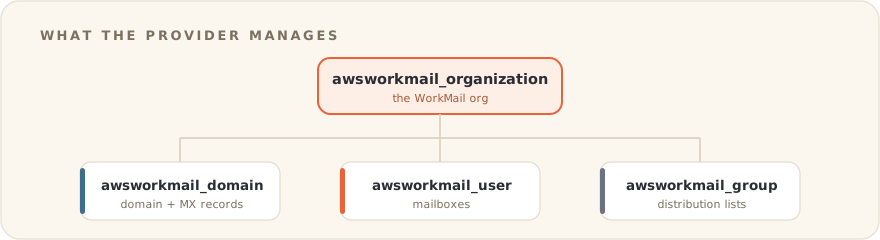
Table of contents
Open Table of contents
What it manages
The provider covers the WorkMail resources that actually matter day to day:
awsworkmail_organization, the WorkMail organization itselfawsworkmail_domain, domain registration, including retrieval of the MX and DNS records you needawsworkmail_user, mailbox usersawsworkmail_group, distribution groups
On the Terraform Registry: gfnogueira/awsworkmail
A minimal setup looks like this:
terraform {
  required_providers {
    awsworkmail = {
      source  = "gfnogueira/awsworkmail"
      version = ">= 0.1.0"
    }
  }
}

provider "awsworkmail" {
  region = "us-east-1"
}

resource "awsworkmail_organization" "main" {
  alias = "my-workmail-org"
}

resource "awsworkmail_domain" "main" {
  organization_id = awsworkmail_organization.main.id
  domain          = "mycompany.com"
}

resource "awsworkmail_user" "john" {
  organization_id = awsworkmail_organization.main.id
  name            = "john.doe"
  display_name    = "John Doe"
  email           = "john.doe@mycompany.com"
}
The detail that made it worth it
The piece I cared about most was the domain. Setting up a WorkMail domain by hand means going to the console, reading off the MX and DNS records, and pasting them into your DNS provider. That is exactly the kind of manual step that rots.
The provider exposes those records as attributes. So the MX record WorkMail wants flows straight into the Route 53 resource next to it, in the same plan. The whole chain, organization to domain to DNS, stays in code. Nothing to copy by hand, nothing to forget.
resource "aws_route53_record" "workmail_mx" {
  zone_id = aws_route53_zone.main.zone_id
  name    = "mycompany.com"
  type    = "MX"
  ttl     = 300
  records = awsworkmail_domain.main.mx_records
}
It also supports assume_role, so it drops cleanly into a multi-account setup where WorkMail lives in its own account.
The value was not really the email. It was removing the one console-only corner from an otherwise fully coded environment. A single manual step is where drift starts.
When to build your own provider
Not every gap deserves a custom provider. Most of the time a null_resource with a script, or an out-of-band step, is enough.
But when the missing piece is something you create, destroy and depend on like any other resource, a real provider is worth it. WorkMail was that. It had a clear resource shape, a real lifecycle, and a place in a dependency graph. That is exactly what providers are for.