Picture a workstation with an empty drive bay. No disk. You press the power button, the NIC blinks, and half a minute later someone is logged into a full desktop with every file exactly where they left it. That was a normal Tuesday for a fleet I ran a few years back, and I still think it is one of the most underrated ways to manage a room full of machines.
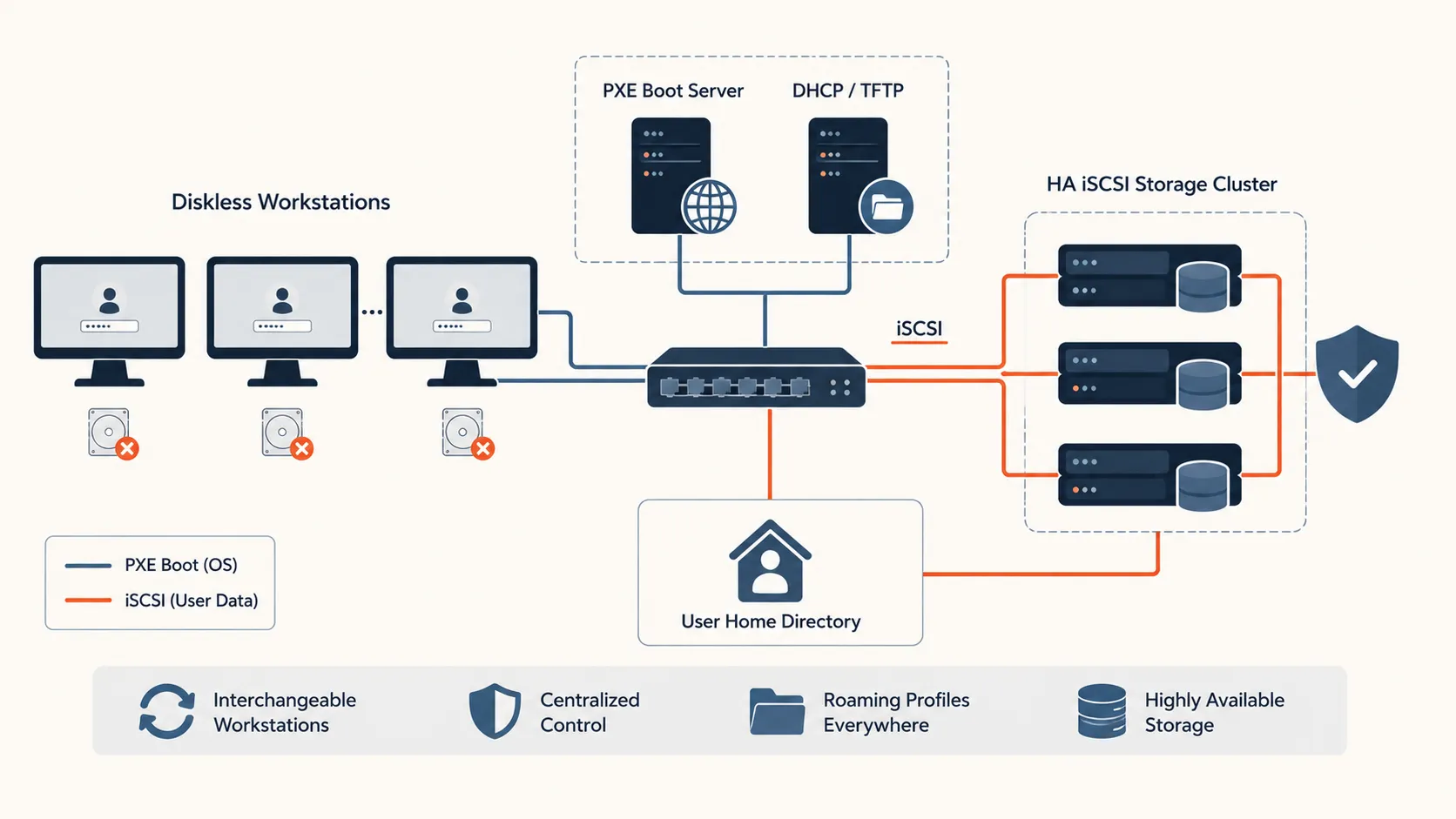
Table of contents
Open Table of contents
The short version
- Staff machines had no local disk. They booted the OS from a central server over the network using PXE.
- Central control made the machines basically interchangeable: any person at any desk, same experience.
- User home directories lived on iSCSI storage served from a cluster, so the data stayed available even if a storage node fell over.
- Roaming profiles came almost for free once the data was central instead of scattered across local drives.
- The hard part was never the boot. It was making the storage boring and reliable.
The context, and the problem
The trouble with a room full of workstations is that each one quietly becomes a special snowflake. Someone installs a thing, someone else saves the only copy of a critical file to the desktop, a disk starts clicking, and a routine hardware swap turns into a small archaeology dig. Multiply that across a fleet and you spend your week doing the same fixes on slightly different machines.
I wanted the opposite. I wanted a machine to be a dumb, replaceable terminal, valuable because it is on the network and not because of anything stored inside it. If a workstation died, the fix should be “grab another one off the shelf, plug it in, done.” No imaging, no restore, no drama.
Diskless netboot gets you there. If nothing lives on the local disk, there is nothing on the local disk to lose.
How it actually worked
The boot flow is the classic PXE chain. The client NIC asks for an address, DHCP hands back where to find a bootloader, and the machine pulls the loader, then a kernel and initramfs, over the network. From there it mounts its root filesystem remotely and comes up like any other Linux box. The user never sees any of it. They see a login prompt.
The DHCP side is the part people always forget, so here is the shape of it.
# dhcpd.conf (trimmed)
next-server 10.0.0.10;          # the PXE/TFTP server
filename "pxelinux.0";          # bootloader the client fetches first

subnet 10.0.0.0 netmask 255.255.255.0 {
  range 10.0.0.50 10.0.0.200;
  option routers 10.0.0.1;
}
Two lines do the real work. next-server says where the boot files are, and filename says what to grab first.
The bootloader then reads its own config and pulls the kernel and initramfs. This is where you point the machine at its network root, one read-only OS tree shared by every client:
# /var/lib/tftpboot/pxelinux.cfg/default
DEFAULT linux
LABEL linux
  KERNEL vmlinuz
  APPEND initrd=initrd.img ip=dhcp root=/dev/nfs nfsroot=10.0.0.10:/srv/nfsroot ro
ip=dhcp gets the machine an address early in boot, and root= plus nfsroot= tell it to mount that shared OS tree read-only. Every workstation boots the exact same image.
The OS image was central. One image, maintained once, served to everyone. Patching became a single job instead of a fleet-wide chore, and every machine that booted came up in the same known-good state. That alone justified the setup.
The one detail worth remembering: keep user data off the boot path
Here is what separates a demo from something you can put real people on. The boot image and the user data are two completely different problems, and you should not solve them the same way.
The OS is read-mostly and identical for everyone, so serving it from one place is fine. Home directories are the opposite. They are precious, unique per person, and losing one is a resume-generating event. So they went nowhere near the boot server. Home directories were served over iSCSI from a cluster, kept highly available, so a single node dying did not take anyone’s files with it.
That split is the whole trick. iSCSI hands the client a block device over the network that behaves like a local disk, and putting that storage behind a cluster means the “disk” survives a node dying.
In practice the client logs into the iSCSI target that holds its home and mounts it, flagged _netdev so it waits for the network first:
# log into the iSCSI target that serves /home, then mount it
iscsiadm -m discovery -t sendtargets -p 10.0.0.20
iscsiadm -m node --login
mount -o _netdev,noatime /dev/disk/by-path/ip-10.0.0.20:3260-iscsi-storage-lun0 /home
Without _netdev the box tries to mount /home before the network exists and the boot hangs. It is the kind of one-flag detail that costs you an afternoon the first time. Boot from the cheap, replaceable thing. Put the data on the thing you actually protect.
Roaming profiles then stopped being a feature I had to build and became a side effect. When your home lives on central storage and any workstation mounts it at login, sitting at a different desk is a non-event. You log in and your stuff is there, because it was never tied to the metal in front of you.
The lesson
The mistake I see with diskless setups is treating them as one clever system. It is really two systems wearing a trenchcoat: a stateless boot layer and a stateful storage layer. Let those blur together and you get the worst of both, a single server whose failure is catastrophic and whose maintenance is nerve-wracking.
Keep them apart and each one gets simple. The boot server can be rebuilt on a bad afternoon because it holds nothing irreplaceable. The storage cluster earns all your paranoia, redundancy, and careful attention, because that is where the value is. Match the effort to the stakes.
Final takeaway
Diskless is not exotic and it is not just for labs. For a managed fleet where machines should be interchangeable and data should be central, PXE for the OS and HA iSCSI for the homes is a genuinely good pattern. Boot from something you can throw away, store data on something you would fight to keep, and do not confuse the two. Do that and a dead workstation becomes a shrug instead of an incident.